neone got any basic tips and instructions ofr trying queeze bit extra pace out my spin bowling amd duran duran 800mhz processor???
please help before i blow the fuker out the water!
cheers
animal
how do i overclock a mad duron 800mhz?
Moderator: Moderators
-
weedguru_animal
- Ganja God

- Posts: 6579
- Joined: Tue Jul 16, 2002 6:07 pm
- Location: south
- Contact:
-
mosherben
- Bonghead

- Posts: 247
- Joined: Mon Aug 08, 2005 7:45 am
- Location: Newcastle
- Contact:
-
weedguru_animal
- Ganja God
- Posts: 6579
- Joined: Tue Jul 16, 2002 6:07 pm
- Location: south
- Contact:
-
mosherben
- Bonghead
- Posts: 247
- Joined: Mon Aug 08, 2005 7:45 am
- Location: Newcastle
- Contact:
Alright I found your board over with it's specs. http://www.msicomputer.com/product/p_sp ... M&class=mb
FSB- Frequancy System Bus
Looks like the FSB is locked at 200HMz. Your system multiplier is currently set at 4, but pushing it to 4.5 would make the CPU run at 900MHz. I'm not really sure if you can have a stable system if you OC it to that. Do you have a manual that came with the board? I can't seem to find a manual on their site.
-
weedguru_animal
- Ganja God
- Posts: 6579
- Joined: Tue Jul 16, 2002 6:07 pm
- Location: south
- Contact:
hey ben,cheers for the help you done wicked work. from what i read the duron 800 can easily be pushed to 950-1000mhz. so maybe its worht a go?
how would i go about changingthe multiplier value to 4.5?
cheers
animal
i cant even get into bios right now, mayb be the weed, but i crazily pressing delete backspace and f8 but cant work out how to get into bios suring startup???ill work that out in time
how would i go about changingthe multiplier value to 4.5?
cheers
animal
i cant even get into bios right now, mayb be the weed, but i crazily pressing delete backspace and f8 but cant work out how to get into bios suring startup???ill work that out in time
-
mosherben
- Bonghead
- Posts: 247
- Joined: Mon Aug 08, 2005 7:45 am
- Location: Newcastle
- Contact:
Yea I just did some digging on your CPU and it is supposed to run fine at 1GHz. http://www.firingsquad.com/hardware/duron800/page2.asp
Changing the system multiplier is ussually done by physically opening up your computer case and changing some jumper positions on your motherboard.
A jumper looks like this
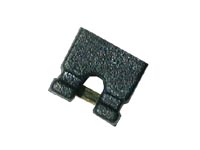
Typically it would look like this on your mainboard

Looking for the correct jumper is a problem because I can't find a manual for your board on the net. What your looking for is a list of numbers in white text saying x1,x1.5,x2 etc. There should be one for x4, so see if there is one for x4.5 or x5. Next to it, it will say 8-10 or something simular. This is refering to the pin numbers the jumper should be placed on. Basicly on both sides of the pins are, it will label which side is odd and which is even. Eg
1 . . . . . 9
2 . . . . . 10
Good luck
Changing the system multiplier is ussually done by physically opening up your computer case and changing some jumper positions on your motherboard.
A jumper looks like this
Typically it would look like this on your mainboard
Looking for the correct jumper is a problem because I can't find a manual for your board on the net. What your looking for is a list of numbers in white text saying x1,x1.5,x2 etc. There should be one for x4, so see if there is one for x4.5 or x5. Next to it, it will say 8-10 or something simular. This is refering to the pin numbers the jumper should be placed on. Basicly on both sides of the pins are, it will label which side is odd and which is even. Eg
1 . . . . . 9
2 . . . . . 10
Good luck
-
weedguru_animal
- Ganja God
- Posts: 6579
- Joined: Tue Jul 16, 2002 6:07 pm
- Location: south
- Contact:
-
13laze
- Sir Toke-a-lot

- Posts: 2279
- Joined: Thu Apr 15, 2004 1:53 am
- Location: Pluto
- Contact:

-
mosherben
- Bonghead
- Posts: 247
- Joined: Mon Aug 08, 2005 7:45 am
- Location: Newcastle
- Contact:
there would be a jumper already there, so you wont need to buy one.
Changing the CPU speed in the BIOs can be done if your board supports it. The only board I've seen that supports it is my sister's p3. To access the BIOs you ussually press F1 or del. I'm pretty sure that if you can change the multiplier then it would be found in "Advanced" or simular.
PS: if you are going for performance then why not just upgrade the RAM? That's much more easier than OCing.
-
weedguru_animal
- Ganja God
- Posts: 6579
- Joined: Tue Jul 16, 2002 6:07 pm
- Location: south
- Contact:
thanks again people, why not ram you say??good and valid question, but overcocking had sounded so much more interesting, and its free?of course it wont be free if i break the pc which is always a possibility due to my 'act first,hope for best, then consider what ive done' approach i assume whenever doing nething with elecltronic equipment.
i will try find this 4x and 5 x thing as simply moving a jumper sounds easyish to do?so i look for something that is over or next to a 4x
and i want to change the jumper to the pins where it say s 5x or 4.5 x?? on the motherucker?
i getting there slowly but surely, so i hope youre all hanging in there waiting for the explosion of pwer i am goin to tap into?
cheers
animal
-
mosherben
- Bonghead
- Posts: 247
- Joined: Mon Aug 08, 2005 7:45 am
- Location: Newcastle
- Contact:
Moving a jumper is really just pulling the tiny thing out and putting it into another set of pins.
Your looking for a jumper than is over the pins that are for 4x. You would need to move the jumper to 4.5x or 5x. If you use 4.5x then your duron will be 900Mhz, and 5x it would be 1GHz. Seems fine to just go straight to 5x according to the link I posted earlier.
PS: One very important thing, make sure your PC is OFF when you are changing the jumpers. I would disconnect the power cord from the PC to make sure I won't press the power button by mistake.
-
weedguru_animal
- Ganja God
- Posts: 6579
- Joined: Tue Jul 16, 2002 6:07 pm
- Location: south
- Contact:
-
weedguru_animal
- Ganja God
- Posts: 6579
- Joined: Tue Jul 16, 2002 6:07 pm
- Location: south
- Contact:
okay i looked and looked and looked at all the tiny little chinese numbers, but there ws no 4x 4.5x 5 x, a few jumpers a bout, with some J's nearby. anyway i have amibios 1999 and i gunne check google for how to overclock my mohterboard?
surely it must be possible, after all this hard work???
can i defitaly not change the multilpier through bios somehow???
animal
surely it must be possible, after all this hard work???
can i defitaly not change the multilpier through bios somehow???
animal
Who is online
Users browsing this forum: No registered users